How to add a vehicle to a quote in Books?
TB Books · quotes · Last updated September 24, 2026 · Version 1
This process works in apps: TB Books, TB POS
This article will teach you how to attach a vehicle by plate, VIN, or year / make / model on a quote, a work order, or the customer profile.
Books and POS both keep the car on the document and on the customer, but the button is in a slightly different place.
In Books, open the quote or work order and click + Vehicle on the Vehicle Info card. In POS, the quote or work order shows + Add Vehicle. Either button opens Add Vehicle: Plate, VIN, or Year / Make / Model, then Save Vehicle.
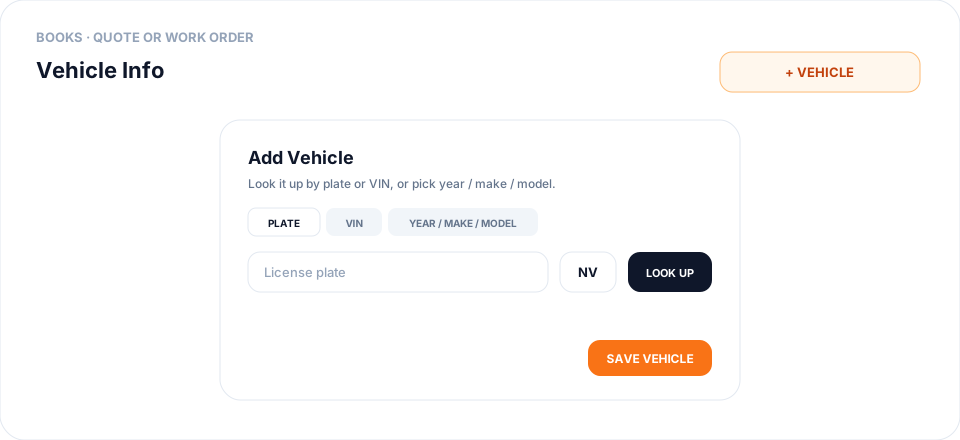
You can also add the car without a quote. Open the customer and select the Vehicles tab, then Add Vehicle. The same window is used. If Enable Use of Vehicles is off, the Vehicle Info card is hidden on Books documents.
Steps
- On a Books quote or work order, find Vehicle Info and click + Vehicle. On a POS quote, click + Add Vehicle.
- In Add Vehicle, stay on Plate to type the license plate, pick the state, and click Look Up. Or switch to VIN and click Decode. Or switch to Year / Make / Model and choose each one.
- Enter Mileage if you have it, then click Save Vehicle.
- The quote or work order shows Year, Make, Model, Plate, VIN, and Mileage. In Books those lines are display-only after you save — click + Vehicle again to change them.
- To keep a car on the customer for the next visit, open Customers, open that customer, and select Vehicles.
- Click Add Vehicle and use Plate, VIN, or Year / Make / Model, then Save Vehicle. Edit or remove a saved car from that same list.
- If Vehicle Info is missing in Books, open Settings → General Settings and turn on Enable Use of Vehicles.
Conclusion & best practices
Search by Vehicle on Products only finds tires or wheels that fit. It does not save the car on the quote or on the customer. Plate and VIN lookup fill year, make, and model for you. If the lookup does not find the car, use Year / Make / Model and save it yourself. Related: How to create a sales quote in Books?.