What is created when I switch Tax Country to Canada?
TB Books · tax · Last updated October 1, 2026 · Version 1
This process works in apps: TB Books, TB POS
This article will teach you that switching Tax Country to Canada creates province taxes, tire levy services, and auto-add rules, and how to remove them later.
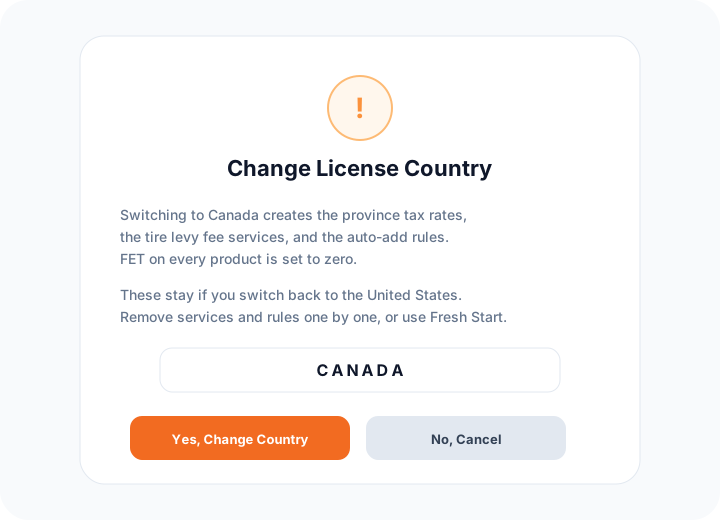
You do not build the Canadian setup one fee at a time. Organization Settings → Tax Rates → Tax Country → Canada creates it. The confirm box is Change License Country. After you type CANADA and click Yes, Change Country, Tire Base adds the province tax rates, the tire levy fee services, and the auto-add rules that attach those fees to tires. FET on every product is set to zero. Switching back to the United States does not delete those records.
Steps
- Open Organization Settings → Tax Rates. Set Tax Country to Canada.
- Read Change License Country. Type CANADA. Click Yes, Change Country. Click No, Cancel if you are not ready — nothing is created until you confirm.
- Tire Base adds province tax rates (GST, HST, PST, RST, and QST), tire levy fee services, and Auto-add Rules. Fees you already saved are left as they are. Ontario has no levy template, because each producer sets that fee. Northwest Territories and Nunavut have no levy.
- To turn one fee off, open Products & Services → Services and click Deactivate on that row. It moves to Inactive. Invoices that already have the fee are not changed.
- To turn one rule off, open Books → Settings → Auto-add Rules (under App Settings). Deactivate the rule, or Delete it. Deleting a rule does not change work orders or invoices that already have the fee.
- Switching Tax Country back to United States keeps the services, rules, and province tax rates. They are not applied on United States documents. Province rates stay on Tax Rates until you edit them.
- A full data restart is Organization Settings → Data Migration → Danger Zone → Fresh Start. That deletes the catalog, including these fee services, and deletes auto-add rules. It does not remove the province tax table. See How to wipe and restart organization data with Fresh Start?.
Conclusion & best practices
Use Deactivate on the fee and the auto-add rule when you only want a few lines gone. Use Fresh Start only when you want the organization data rebuilt. Load levy templates on Tax Rates adds fee services and rules that are missing. It does not overwrite a price you already saved. Confirm levy amounts with the province before you remit them.