How to set Canadian GST, HST, PST, and tire levies in Books?
TB Books · tax · Last updated October 1, 2026 · Version 1
This process works in apps: TB Books, TB POS
This article will teach you how to switch the shop to Canada, edit province tax rules, capture GST numbers on customers, and auto-add EHF tire levies.
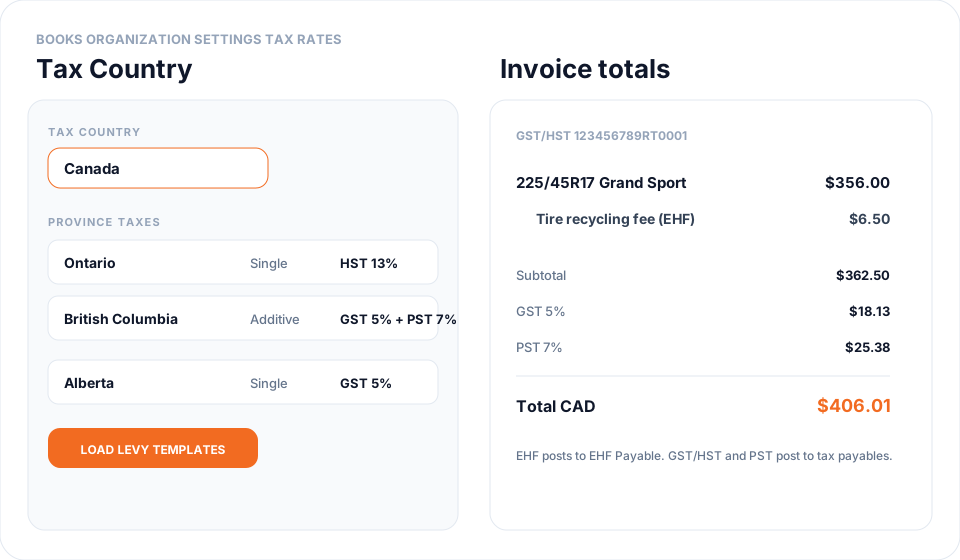
Canadian shops charge GST or HST plus a provincial tax in some provinces, and a separate tire recycling fee (EHF) that is not a tax. Organization Settings → Tax Rates has a Tax Country control. Switching to Canada creates province rates (GST 5%, HST, PST/RST/QST), payable accounts, tire levy fee services, and auto-add rules. Those services and rules stay until you delete them one by one or run Data Migration → Fresh Start. Quotes, work orders, and invoices then pick a province and print GST/HST and PST as separate totals in CAD.
Steps
- Open Organization Settings → Tax Rates. Choose Tax Country → Canada and type CANADA. Tire Base creates the province tax rates, the tire levy fee services, and the auto-add rules. FET on catalog items is zeroed. Those records stay if you switch back. Delete services and rules one by one, or use Data Migration → Fresh Start. Province tax rates stay on this page until you edit them.
- Review Province Taxes. Edit a province to change GST/HST or PST/RST/QST rates and whether they are Single or Additive. Enter the shop GST/HST (and QST) registration numbers so they print on invoices.
- Load levy templates only adds fee services and auto-add rules that are missing. It does not overwrite a fee you already saved. A fee is added only when the document province matches that fee. Ontario is left blank because each producer sets its own fee. See How to add a Canadian tire levy (EHF or taxe pneu) in Books.
- On a customer, open Canada Tax Settings. Enter GST/HST, PST, QST, or First Nations registry numbers. Check PST/QST exempt, First Nations exempt, or EHF exempt when the customer should skip those charges.
- On a quote, work order, or invoice, the tax picker becomes a province list. Ship-to province is used for delivered orders; otherwise the location province. Totals show GST/HST and PST/QST on their own rows, plus EHF as a recycling fee line — never labeled as tax.
- Open Reports → GST/HST & Provincial Tax for the filing period. GST and HST are the federal section. PST, RST, and QST are a separate section. Sales Tax Liability stays hidden when Tax Country is Canada. See How to run the GST/HST and provincial tax report in Books?.
Conclusion & best practices
Canadian tax posts to GST/HST Payable, PST/RST Payable, QST Payable, and EHF Payable instead of sitting in Sales. Keep FET off Canadian tickets. Confirm Nova Scotia HST (14% as of April 2025) and levy amounts with the province before remitting. Input tax credits on bills are not in this release. What the switch creates, and how to remove it, is in What is created when I switch Tax Country to Canada?. Shops use different names for the same taxes — see What do GST, HST, PST, QST, TPS, and TVQ mean in Tire Base?. The per-tire fee is separate — see How to add a Canadian tire levy (EHF or taxe pneu) in Books?.