How to hard refresh a Tire Base page?
TB One · dashboard · Last updated October 21, 2026 · Version 1
This process works in apps: TB Books, TB POS, TB Sync, TB WMS, TB CRM, TB Reports, TB One
This article will teach you how to load a fresh copy of Tire Base when a page looks old, blank, or stuck after an update.
A normal refresh can keep the saved copy of the page. A hard refresh asks the browser for the newest copy. Use it when Tire Base looks out of date, a screen stays blank, or you see This page needs a refresh. It does not delete your account, invoices, or inventory.
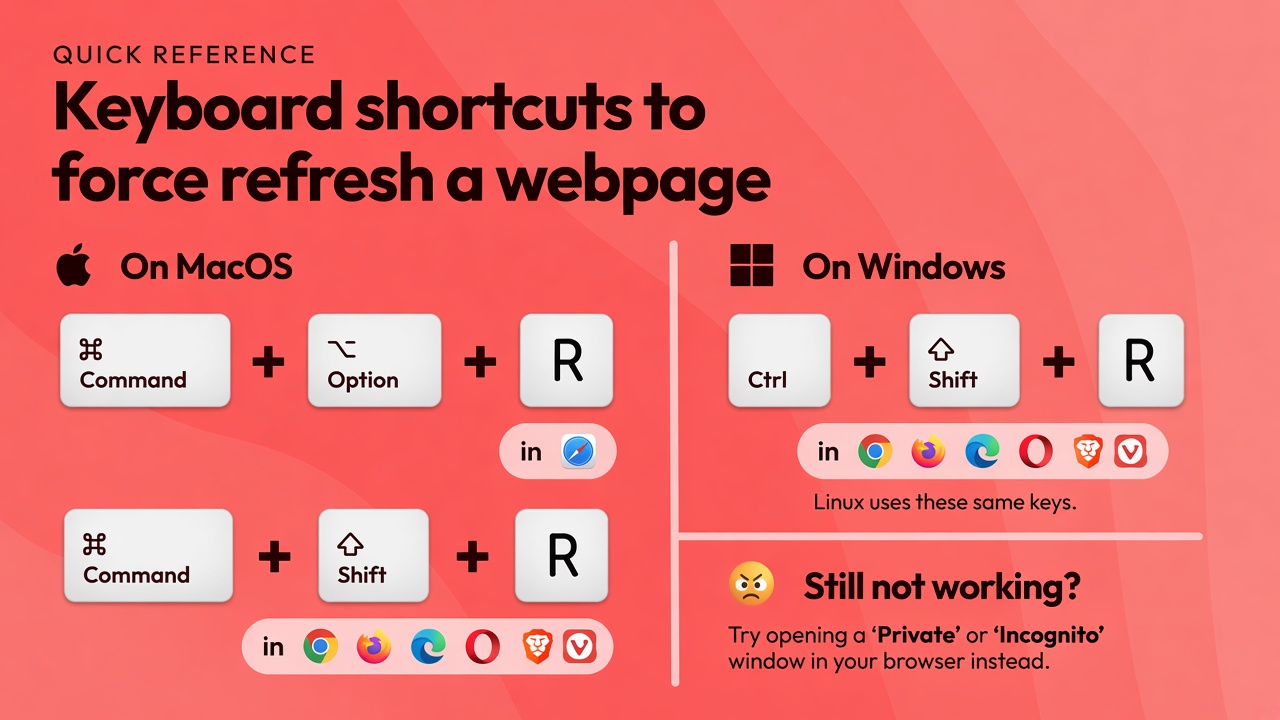
Steps
- Stay on the Tire Base tab that looks old, blank, or stuck.
- On a Mac, in Safari, press Command + Option + R.
- On a Mac, in Chrome, Edge, Firefox, Opera, or Brave, press Command + Shift + R.
- On Windows or Linux, press Ctrl + Shift + R. Linux uses the same keys as Windows.
- If the screen says This page needs a refresh, or Application Interrupted, click the orange Hard Refresh button.
- On a phone, tap Hard Refresh when that screen is showing. A phone does not have this keyboard shortcut. If you do not see the button, close the tab and open Tire Base again.
- If the page still looks old, open a Private or Incognito window and sign in again.
- Command + R, Ctrl + R, and F5 are a normal refresh. They can keep the saved page. Use the shortcuts above after Tire Base updates.
Conclusion & best practices
A hard refresh only replaces the saved copy of the page. Do not clear all browsing data or reinstall the browser for a stale page. If Hard Refresh and a private window still show the old screen, tell support which app you opened and what you clicked.