How to add users and technicians?
TB POS · settings · Last updated October 27, 2026 · Version 1
This process works in apps: TB POS, TB One, TB Books
This article will teach you how to invite an employee, then mark that person as a technician for the calendar and work orders.
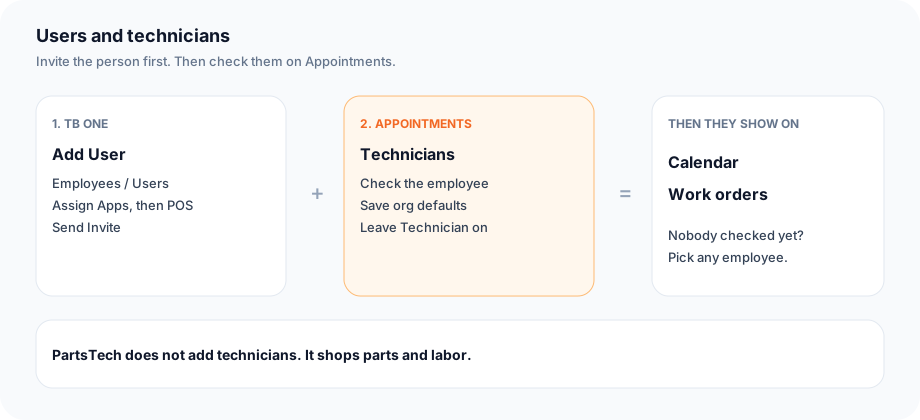
A technician is an employee you turn on. Invite the person in TB One first. Then, on Appointments, check their name. That check is what the calendar and the work-order technician list use. Until someone is checked, a work order still lets you pick any employee.
Steps
- Open POS Settings. Under Organization Settings, open Employees / Users.
- Click Manage Users in ONE. That opens TB One on the Users page.
- Click Add User. Enter the first name, last name, and email. Under Assign Apps, choose POS. Leave the role on Staff unless this person should manage settings. Click Send Invite.
- Return to POS Settings. Under Organization Settings, open Appointments. The same Appointments page is in Books Settings.
- Under Book appointments by, leave Technician checked so the calendar can book a person. Bay can stay on too.
- Under Technicians, check each employee who should take jobs. Click Save org defaults.
- When one person works different hours than the shop, choose them in the technician hours list, set the days, and click Save technician hours. Saving hours also marks that person as a technician.
- On a work order, the technician list is the people you checked. The calendar books against those same people.
Conclusion & best practices
Invite the person before you look for them on Appointments. Appointments only lists employees who already belong to the shop. Checking the name is the technician setup. PartsTech is parts and labor shopping, not the technician list.