How to set up distribution centers for B2B and Sync?
TB Sync · settings · Last updated October 1, 2026 · Version 1
This process works in apps: TB Sync, TB Books, TB POS, TB One
This article will teach you how to build one company list of named distribution centers, turn them on per B2B portal, and filter B2B search and Sync inventory by those names.
Distribution centers are named stock groups for the whole license, not a copy per B2B portal. Create them once under Organization Settings. Each center can include warehouse locations and vendor connections, a display cap (100+), and a shipping method for the ETA dealers see. B2B portals only turn centers on or off and pick a portal default. Dealers filter search by the center name. Sync inventory uses the same company list.
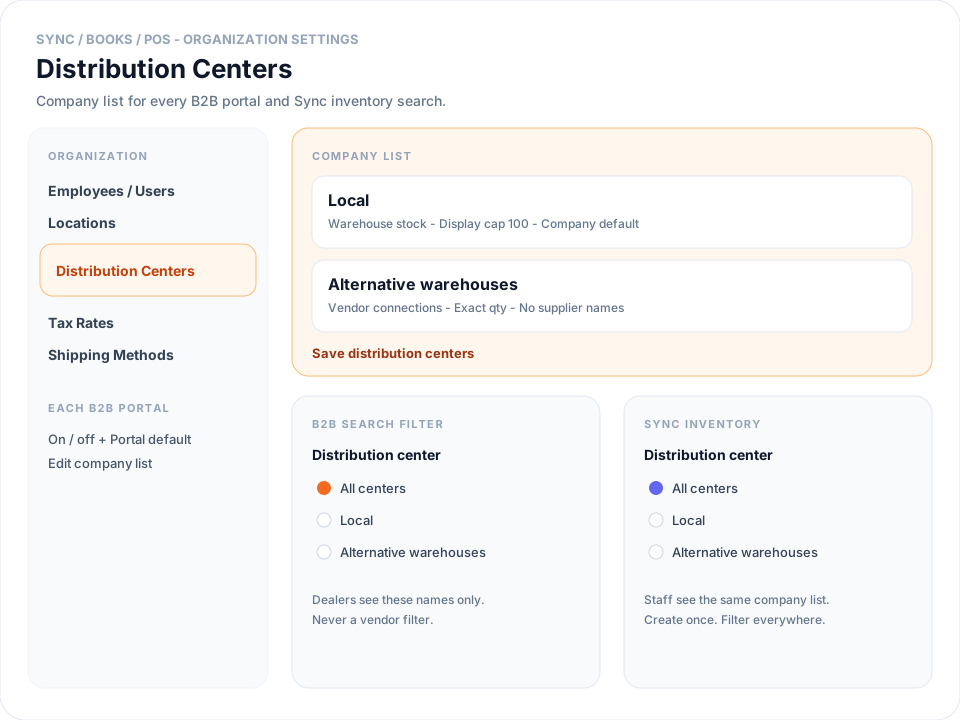
If this page is empty the first time you open it, Tire Base copies the list from a B2B portal that already had centers. When two portals differ, choose which list becomes the company list, then save.
Steps
- Open Settings → Distribution Centers under Organization Settings (Sync, Books, POS, or One).
- Add or rename centers with dealer-safe names such as Local, West, or Alternative warehouses. Do not put a supplier name on a center.
- Click Edit. Under Local inventory, check the warehouses for that center. Under Vendor connections, check the feeds that belong on that line. Set Display cap and Shipping method if dealers should see 100+ or an ETA, then Done.
- Click Save distribution centers. Mark one Company default.
- Open Sync → Sales Channels → the B2B portal → B2B Settings. Turn centers on or off for that portal and pick Portal default. Leave every box checked to offer the whole company list. Click Save B2B Settings.
- On the B2B site, search a size, switch to Cards if needed, and use the Distribution center filter. Dealers see names only — never a vendor list.
- In Sync → Inventory, use the same Distribution center filter in the sidebar to limit results to one named center.
Conclusion & best practices
Create the list once on the license. Portals only hide or default a center. Related: How to configure B2B Settings and show inventory as 100+?, How to show a delivery delay or ETA on the B2B portal?, and How to search vendor inventory in Sync?.